![[PukiWiki]](image/pukiwiki.png "[PukiWiki]")
Spring BootでWebAPI作成 †Spring Tool Suite (STS) のダウンロード †STSの日本語化 †http://mergedoc.osdn.jp/ テスト用DBの準備(MySQL) †DB、ユーザ作成 †/* DB作成 */ CREATE DATABASE example_db DEFAULT CHARACTER SET utf8; /* ユーザ作成 */ CREATE USER 'example_user'@'%' IDENTIFIED BY 'example_pass'; /* 権限付与 */ GRANT ALL ON example_db.* TO 'example_user'@'%'; exit; 作成したユーザで接続し直してテーブル作成 †mysql -h localhost -P 3306 -u example_user -p example_db
/* テーブル作成 */
CREATE TABLE `books` (
`id` int(11) NOT NULL AUTO_INCREMENT,
`isbn` varchar(255) DEFAULT NULL,
`title` varchar(255) DEFAULT NULL,
`price` int(11) DEFAULT NULL,
`created_at` datetime NOT NULL,
`updated_at` datetime NOT NULL,
PRIMARY KEY (`id`)
) ENGINE=InnoDB DEFAULT CHARSET=utf8;
/* 索引作成 */
create index books_idx1 on books (isbn);
/* データ作成 */
insert into books(isbn,title,price,created_at,updated_at)
values('978-4822280536', 'デッドライン', 2376, NOW(), NOW())
,('978-4873114798', 'プログラマが知るべき97のこと', 2052, NOW(), NOW())
,('978-4873115658', 'リーダブルコード', 2592, NOW(), NOW())
,('978-4891004552', 'CODE COMPLETE 第2版 上 完全なプログラミングを目指して', 6588, NOW(), NOW())
,('978-4891004569', 'CODE COMPLETE 第2版 下 完全なプログラミングを目指して', 6588, NOW(), NOW())
,('978-4894712744', '達人プログラマー', 3456, NOW(), NOW())
,('978-4822285241', 'ピープルウエア', 2200, NOW(), NOW())
,('978-4621066089', '人月の神話', 3456, NOW(), NOW());
Spring Boot プロジェクトの作成 †[新規] → [Spring スタータープロジェクト] † 変えたい所がされば変更して「次へ」 † O/Rマッパー、テンプレートエンジンなどを選択 †※build.gradle の dependencies に反映されるだけなので、後からでも変更可能。 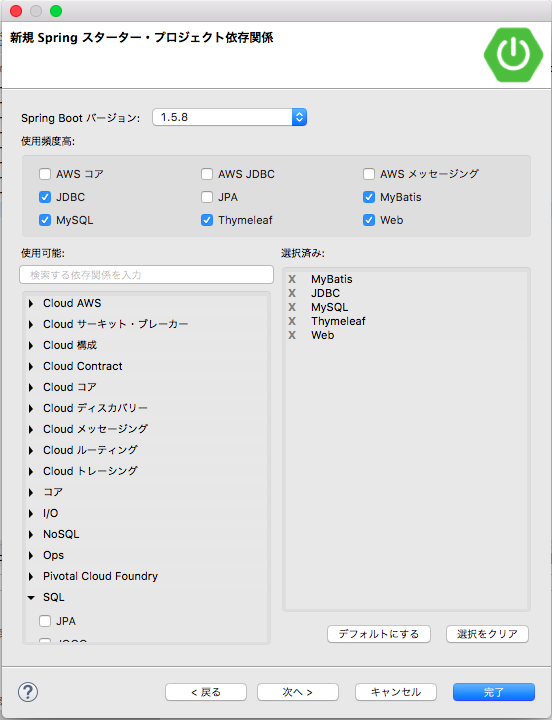 application.properties にDB接続情報を追加 †src/main/resources/application.properties spring.datasource.url=jdbc:mysql://localhost:3306/example_db spring.datasource.username=example_user spring.datasource.password=example_pass spring.datasource.driver-class-name=com.mysql.jdbc.Driver spring.datasource.tomcat.maxActive=30 spring.datasource.tomcat.maxIdle=20 spring.datasource.tomcat.minIdle=10 spring.datasource.tomcat.initialSize=5 ※これらの値はOS環境変数などで上書き可能なので、ここではローカル用の設定をそのまま記述する。 テーブル定義の作成 †しれっと lombok 使って setter 、getter を動的生成してるので、 src/main/java/com/example/demo/model/Book.java package com.example.demo.model;
import java.io.Serializable;
import java.util.Date;
import lombok.Data;
@Data
public class Book implements Serializable {
private static final long serialVersionUID = 1L;
private int id;
private String isbn;
private String title;
private int price;
private int created_at;
private Date createdAt;
private Date updatedAt;
}
Daoの作成 †src/main/java/com/example/demo/dao/BookDao.java package com.example.demo.dao;
import java.util.List;
import com.example.demo.model.Book;
public interface BookDao {
List<Book> selectAll();
Book select(int id);
void insert(Book book);
int update(Book book);
int delete(int id);
}
MyBatis用のDao定義を作成 †src/main/resources/dao/BookDao.xml <!--?xml version="1.0" encoding="UTF-8" ?-->
<!DOCTYPE mapper PUBLIC "-//mybatis.org//DTD Mapper 3.0//EN" "http://mybatis.org/dtd/mybatis-3-mapper.dtd" >
<mapper namespace="com.example.demo.dao.BookDao">
<select id="selectAll" resultType="com.example.demo.model.Book">
select * from books
</select>
<select id="select" parameterType="int" resultType="com.example.demo.model.Book">
select * from books where id = #{id}
</select>
<insert id="insert" parameterType="com.example.demo.model.Book">
insert into books (isbn,title,price,created_at,updated_at)
values(#{isbn},#{title},#{price},now(),now())
<!-- MySQLの場合、以下で自動採番(AUTO_INCREMENT)されたIDをオブジェクトにセットできる -->
<selectKey resultType="int" keyProperty="id" order="AFTER">
select @@IDENTITY <!-- SELECT LAST_INSERT_ID() でも可 -->
</selectKey>
</insert>
<update id="update" parameterType="com.example.demo.model.Book">
update books set isbn = #{isbn}, title = #{title}, price = #{price}, updated_at = now() where id = #{id}
</update>
<delete id="delete" parameterType="int">
delete from books where id = #{id}
</delete>
</mapper>
mybatis-config.xml を追加 †参照: http://www.mybatis.org/mybatis-3/ja/configuration.html#settings src/main/resources/mybatis-config.xml <!DOCTYPE configuration
PUBLIC "-//mybatis.org//DTD Config 3.0//EN"
"http://mybatis.org/dtd/mybatis-3-config.dtd">
<configuration>
<settings>
<setting name="lazyLoadingEnabled" value="true" />
<setting name="useColumnLabel" value="true" />
<setting name="mapUnderscoreToCamelCase" value="true" />
</settings>
</configuration>
MyBatis用のConfigクラスを追加 †src/main/java/com/example/demo/config/SqlMappingConfig.java package com.example.demo.config;
import java.io.IOException;
import javax.sql.DataSource;
import org.mybatis.spring.SqlSessionFactoryBean;
import org.mybatis.spring.annotation.MapperScan;
import org.springframework.context.annotation.Bean;
import org.springframework.context.annotation.Configuration;
import org.springframework.core.io.DefaultResourceLoader;
import org.springframework.core.io.support.ResourcePatternResolver;
import org.springframework.core.io.support.ResourcePatternUtils;
@Configuration
@MapperScan("com.example.demo.dao")
public class SqlMappingConfig {
/**
* SqlSessionFactoryBean格納クラス。
* @return SqlSessionFactoryBean。
*/
@Bean
public SqlSessionFactoryBean sqlSessionFactoryBean(DataSource dataSource) throws IOException {
SqlSessionFactoryBean factory = new SqlSessionFactoryBean();
factory.setDataSource(dataSource);
ResourcePatternResolver resolver =
ResourcePatternUtils.getResourcePatternResolver(new DefaultResourceLoader());
factory.setConfigLocation(resolver.getResource("classpath:mybatis-config.xml"));
factory.setMapperLocations(resolver.getResources("classpath:dao/**/*.xml"));
return factory;
}
}
コントローラの作成 †src/main/java/com/example/demo/controller/BookController.java package com.example.demo.controller;
import java.util.HashMap;
import java.util.List;
import java.util.Map;
import org.springframework.beans.factory.annotation.Autowired;
import org.springframework.web.bind.annotation.ModelAttribute;
import org.springframework.web.bind.annotation.PathVariable;
import org.springframework.web.bind.annotation.RequestMapping;
import org.springframework.web.bind.annotation.RequestMethod;
import org.springframework.web.bind.annotation.RestController;
import com.example.demo.dao.BookDao;
import com.example.demo.model.Book;
@RestController
@RequestMapping("/api")
public class BookController {
@Autowired
private BookDao bookMapper;
@RequestMapping(value = "/books", method = RequestMethod.GET)
public List<Book> selectAll() {
List<Book> books = bookMapper.selectAll();
for (Book book : books) {
System.out.println(book.toString());
}
return books;
}
@RequestMapping(value = "/book/{id}", method = RequestMethod.GET)
public Book select(@PathVariable("id") Integer id) {
Book books = bookMapper.select(id);
return books;
}
@RequestMapping(value = "/book", method = RequestMethod.POST)
public Book create(@ModelAttribute Book book) {
bookMapper.insert(book);
return book;
}
@RequestMapping(value = "/book/{id}", method = RequestMethod.PUT)
public Map<String,String> update(@PathVariable("id") Integer id, @ModelAttribute Book book) {
Map<String,String> results = new HashMap<String, String>();
book.setId(id);
int count = bookMapper.update(book);
results.put("result", count == 1 ? "OK" : "NG");
return results;
}
@RequestMapping(value = "/book/{id}", method = RequestMethod.DELETE)
public Map<String,String> delete(@PathVariable("id") Integer id) {
Map<String,String> results = new HashMap<String, String>();
int count = bookMapper.delete(id);
results.put("result", count == 1 ? "OK" : "NG");
return results;
}
}
ビルド †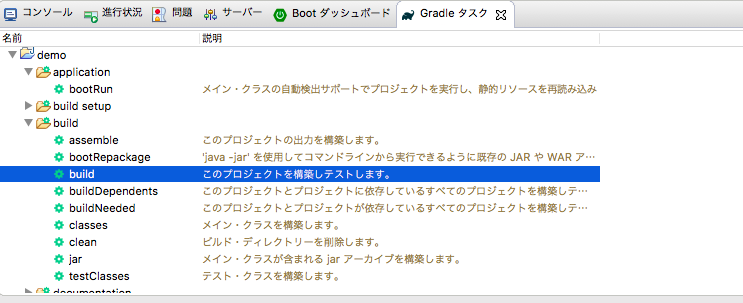 起動 † 動作確認 †# 一覧検索 curl -v http://localhost:8080/api/books # 一意検索 curl -v http://localhost:8080/api/book/1 # 登録 curl -v -XPOST --data "title=TEST&isbn=XXXXX&price=1234" http://localhost:8080/api/book/ # 更新 curl -v -XPUT --data "title=UPDATE&isbn=YYYY&price=5678" http://localhost:8080/api/book/4 # 削除 curl -v -XDELETE http://localhost:8080/api/book/4 おまけ(動作確認用のページ追加) †src/main/java/com/example/demo/config/StaticResourceConfig.java package com.example.demo.config;
import org.springframework.context.annotation.Configuration;
import org.springframework.web.servlet.config.annotation.ResourceHandlerRegistry;
import org.springframework.web.servlet.config.annotation.WebMvcConfigurerAdapter;
@Configuration
public class StaticResourceConfig extends WebMvcConfigurerAdapter {
@Override
public void addResourceHandlers(ResourceHandlerRegistry registry) {
registry.addResourceHandler("/static/**")
.addResourceLocations("classpath:/static/");
}
}
src/main/resources/static/book.html <!DOCTYPE html>
<html>
<head>
<meta charset="utf-8">
<style>
#booklist {
border-collapse: collapse;
}
#booklist th, #booklist td {
padding: 4px 10px;
border: 1px solid #333;
}
#booklist th {
background: #ccc;
}
#booklist td {
cursor: pointer;
}
</style>
<script src="https://ajax.googleapis.com/ajax/libs/jquery/1.11.1/jquery.min.js"></script>
<script src="/js/ajax.js"></script>
</head>
<body>
<form action="/api/books" method="get" >
<input type="submit" value="一覧検索" data-method="get" data-callback="resultList" />
<table id="booklist">
<thead>
<tr>
<th>id</th>
<th>isbn</th>
<th>title</th>
<th>price</th>
</tr>
</thead>
<tbody>
</tbody>
</table>
</form>
<hr />
<form action="/api/book" method="get" >
id : <input type="text" name=id value="1" /><br />
<input type="submit" value="一意検索" data-method="get" />
</form>
<hr />
<form action="/api/book" method="post">
isbn : <input type="text" name="isbn" value="123-4567890123" /><br />
title : <input type="text" name="title" value="test1" /><br />
price : <input type="number" name="price" value="1000" /><br />
<input type="submit" value="登録" data-method="post" />
</form>
<hr />
<form action="/api/book">
id : <input type="text" name="id" value="1" /><br />
isbn : <input type="text" name="isbn" value="123-4567890123" /><br />
title : <input type="text" name="title" value="test2" /><br />
price : <input type="number" name="price" value="1000" /><br />
<input type="submit" value="更新" data-method="put" />
</form>
<hr />
<form action="/api/book">
id : <input type="text" name="id" value="1" /><br />
<input type="submit" value="削除" data-method="delete" />
</form>
<hr />
結果
<div id="result" style="border:1px solid #000000;padding:10px;"></div>
<script>
// 一覧検索結果の描画
window.resultList = function(result){
console.log("callback!");
$("#booklist tbody").empty();
if (result && result.length > 0) {
for (var i in result) {
var rowHTml = "<tr>"
+ "<td>"+result[i]["id"]+"</td>"
+ "<td>"+result[i]["isbn"]+"</td>"
+ "<td>"+result[i]["title"]+"</td>"
+ "<td>"+result[i]["price"]+"</td>"
+ "</tr>";
$("#booklist tbody").append(rowHTml);
}
}
};
jQuery(function($){
// 一覧の任意の行を選択時
$(document).on("click", "#booklist tbody td", function(){
var id = $(this).parents("tr").find("td").eq(0).text();
var isbn = $(this).parents("tr").find("td").eq(1).text();
var title = $(this).parents("tr").find("td").eq(2).text();
var price = $(this).parents("tr").find("td").eq(3).text();
$(document).find("[name=id]").val(id);
$(document).find("[name=isbn]").val(isbn);
$(document).find("[name=title]").val(title);
$(document).find("[name=price]").val(price);
});
});
</script>
</body>
</html>
src/main/resources/static/js/ajax.js jQuery(function($){
$("form").each(function(){
$(this).find("input[type=submit]").on("click", function(e){
$btn = $(this);
$form = $(this).parents("form");
var method = $btn.data("method").toLowerCase();
var url = $form.attr("action");
var callbackFunc = null;
var callback = $btn.data("callback");
if (callback && window[callback]) {
callbackFunc = window[callback];
}
var data = {};
$form.find("[name]").each(function(){
var name = $(this).attr("name");
var val = $(this).val();
if ($(this).attr("type") == "checkbox") {
val = ($(this).prop("checked") ? $(this).val() : data[name]) || "";
} else if ($(this).attr("type") == "radio"){
val = ($(this).prop("checked") ? $(this).val() : data[name]) || "";
}
data[name] = val;
});
if ((method == "put" || method == "delete" || method == "get") && data["id"]) {
url = url + "/" + data["id"];
delete(data["id"]);
}
console.log("url :" + url);
console.log("method:" + method);
console.log(data);
$.ajax({
"url" : url
,"data" : data
,"type" : method
,"dataType" : "json"
,"success" : function(result){
console.log("success!");
console.log(result);
var resultText = "url : " + url + "<br />"
+ "method : " + method + "<br />"
+ "result : " + JSON.stringify(result);
$("#result").html(resultText);
if (callbackFunc){
callbackFunc(result);
}
}
,"error" : function(a1){
console.log("error!");
console.log(a1);
}
});
return false;
});
});
});
以上のファイルを作成すれば http://localhost:8080/static/book.html から CRUD の確認ができる。 |
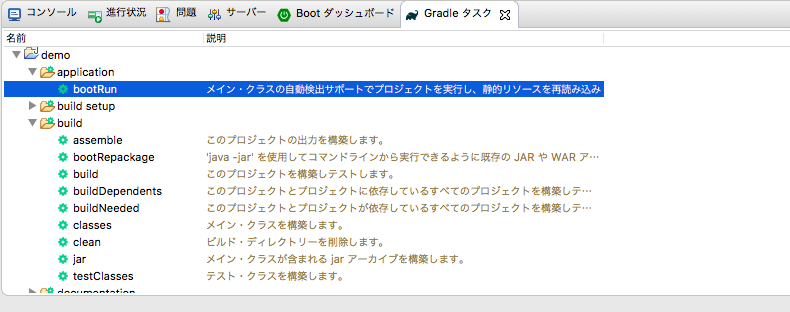 gradle_boot_run.png 588件
[詳細]
gradle_boot_run.png 588件
[詳細]
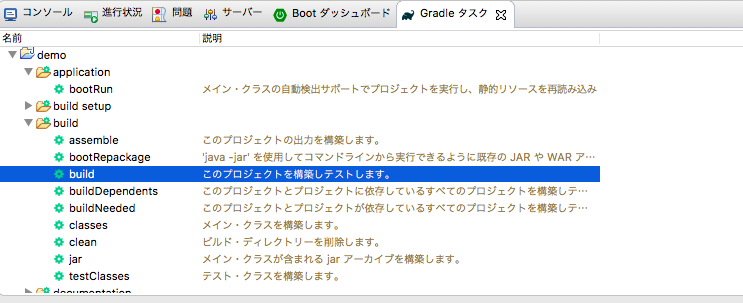 gradle_build.png 631件
[詳細]
gradle_build.png 631件
[詳細]
 create_project3.png 636件
[詳細]
create_project3.png 636件
[詳細]
 create_project2.png 581件
[詳細]
create_project2.png 581件
[詳細]
 create_project.png 700件
[詳細]
create_project.png 700件
[詳細]


