![[PukiWiki]](image/pukiwiki.png "[PukiWiki]")
概要 †Azure AD ログインを使用するように構成された App Service にGoからアクセスする方法を記載する。 ※1 https://docs.microsoft.com/ja-jp/azure/active-directory/develop/scenario-desktop-acquire-token?tabs=dotnet#username-and-password 目次 †
準備 †リソース作成 †#!/bin/bash
# 全てのリソース名に付与する接頭文字 (Storageアカウント名などは世界でユニークな必要があるので他ユーザと被らないような名前を付ける)
PREFIX=XXXXXXXXXXX
# リージョン
region=japaneast
# リソースグループ名
resourceGroup=${PREFIX}ResourceGroup
# App Service
webappName=${PREFIX}SampleApp
webappPlan=F1
1_resources.sh #!/bin/bash
source ./0_env.sh
# リソースの作成
if [ "$1" == "--create" ]; then
# リソースグループの作成
echo az group create
az group create --name $resourceGroup --location $region
# App Service のデプロイ
cd appservice
az webapp up --sku $webappPlan -n $webappName -l $region -g ${resourceGroup}
cd ../
fi
# リソースの削除
if [ "$1" == "--delete" ]; then
az group delete --name $resourceGroup -y
fi
appservice/app.py from flask import Flask
import json
import datetime
app = Flask(__name__)
@app.route("/hello", methods=['GET', 'POST'])
def hello():
message = f"This is Sample response! ({datetime.datetime.now()})"
return json.dumps({'message': message}), 200, {'Content-Type': 'application/json; charset=utf-8'}
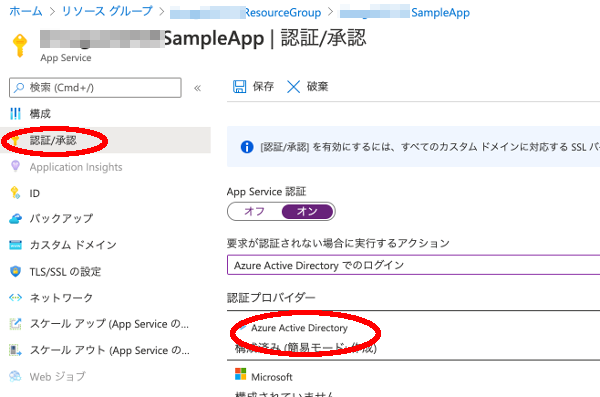
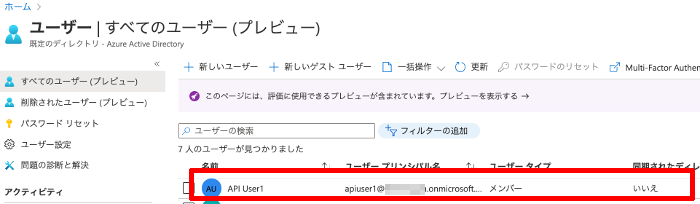
appservice/requirements.txt Flask アクセス確認用のユーザ作成 †Azure Active Directory → ユーザ からアクアセス確認用のユーザを作成しておく。 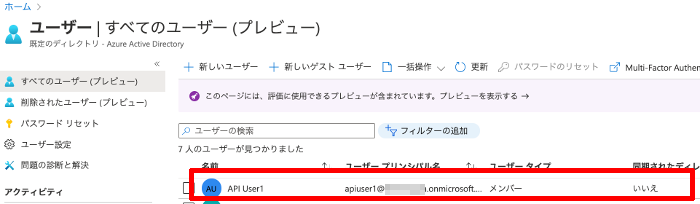 デプロイしたアプリのAAD認証を有効にする †App Service から対象のアプリを選択後、[認証/承認] を選択して以下の通り設定。 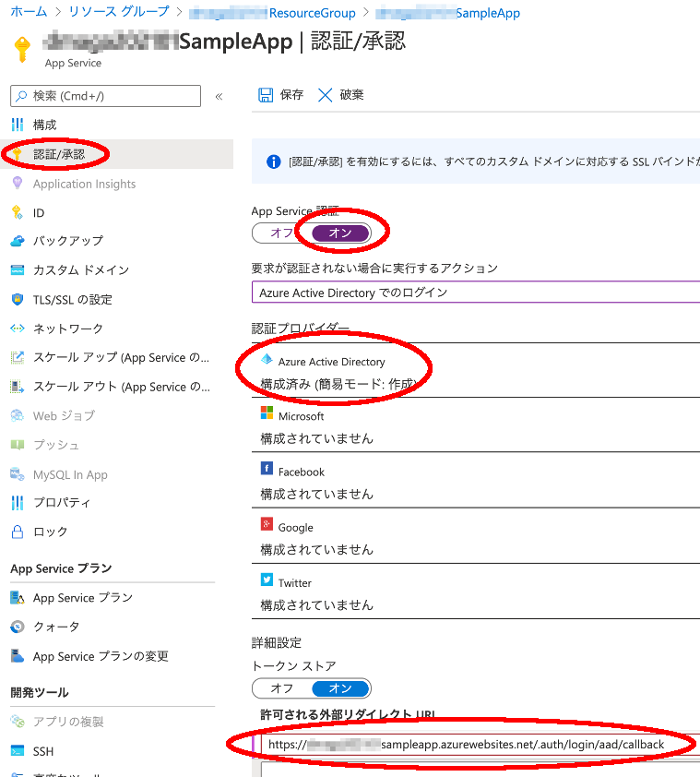 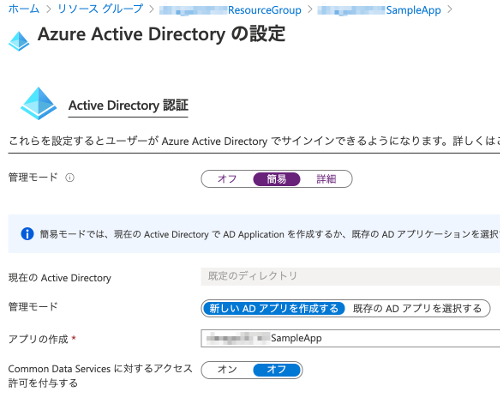 プログラムからAAD認証する為の設定 †Active Directory → アプリの登録 から、対象のアプリを選択後、以下の通り設定する。  APIのアクセス許可を下図の通り追加する。(xxxxxSampleApp は今回登録した App Service のアプリ名) 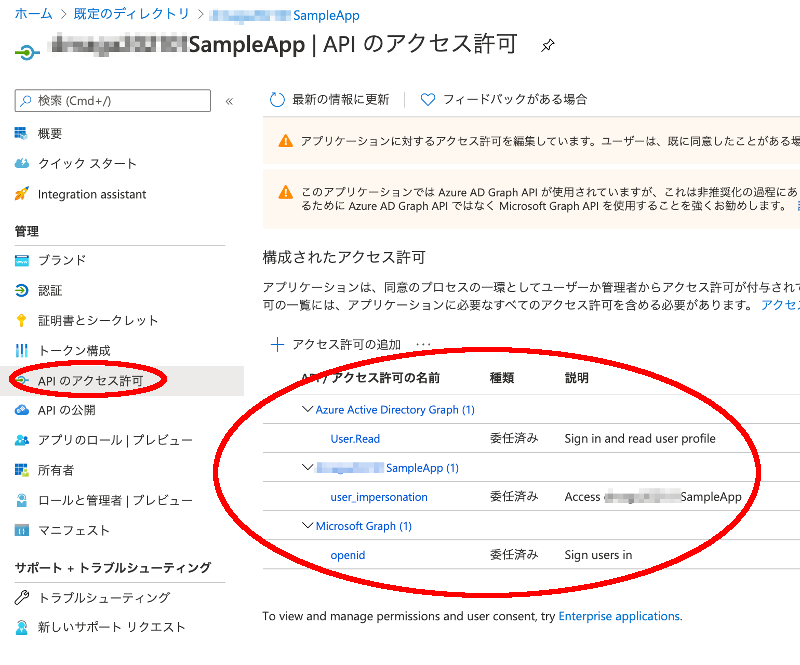 いったんブラウザからアプリにアクセスする †ユーザの同意を得る必要があるので、いったんブラウザからアプリにアクセスして対象ユーザでログイン 及び 同意(承認)しておく。 GoでAAD認証するコードの作成 †test.go package main
import (
"bytes"
"fmt"
"io/ioutil"
"net/http"
//"net/url"
"os"
"time"
"github.com/Azure/go-autorest/autorest/azure/auth"
"github.com/Azure/go-autorest/autorest/adal"
//"github.com/Azure/go-autorest/autorest/azure"
)
const clientID string = "xxxxxxxx-xxxx-xxxx-xxxx-xxxxxxxxxxxx"
const tenantID string = "xxxxxxxx-xxxx-xxxx-xxxx-xxxxxxxxxxxx"
const username string = "xxxx@xxxx.onmicrosoft.com"
const password string = "xxxxxxxx"
const resource string = "xxxxxxxx-xxxx-xxxx-xxxx-xxxxxxxxxxxx"
const apiUrl string = "https://xxxxxxxxsampleapp.azurewebsites.net/hello"
func getToken() string {
// トークンの取得
config := auth.NewUsernamePasswordConfig(username, password, clientID, tenantID)
fmt.Printf("ClientID: : %v\n" , config.ClientID)
fmt.Printf("Username : %v\n" , config.Username)
fmt.Printf("TenantID : %v\n" , config.TenantID)
fmt.Printf("AADEndpoint: %v\n" , config.AADEndpoint)
fmt.Printf("Resource : %v\n" , config.Resource)
config.Resource = resource
//oauthConfig, err := adal.NewOAuthConfig(azure.PublicCloud.ActiveDirectoryEndpoint, tenantID)
oauthConfig, err := adal.NewOAuthConfig(config.AADEndpoint, tenantID)
if err != nil {
fmt.Printf("NewOAuthConfig Error! %v\n", err)
}
spt, sptErr := adal.NewServicePrincipalTokenFromUsernamePassword(*oauthConfig, clientID, username, password, resource)
//spt, sptErr := adal.NewServicePrincipalTokenFromUsernamePassword(*oauthConfig, clientID, username, password, config.Resource)
if sptErr != nil {
fmt.Printf("sptErr: %v\n", sptErr)
return ""
}
err = spt.Refresh()
if err != nil {
fmt.Printf("Refresh Error: %v\n", err)
return ""
}
//oAuthToken := spt.OAuthToken()
token := spt.Token()
//fmt.Printf("oAuthToken: %v\n", oAuthToken)
//fmt.Printf("token: %v\n", token)
fmt.Printf("token.AccessToken : %v\n", token.AccessToken)
//fmt.Printf("token.RefreshToken: %v\n", token.RefreshToken)
//fmt.Printf("token.ExpiresIn : %v\n", token.ExpiresIn)
//fmt.Printf("token.ExpiresOn : %v\n", token.ExpiresOn)
//fmt.Printf("token.NotBefore : %v\n", token.NotBefore)
fmt.Printf("token.Resource : %v\n", token.Resource)
fmt.Printf("token.Type : %v\n", token.Type)
return token.AccessToken
}
func sendRequest() {
token := getToken()
if token == "" {
fmt.Println("GetToken Error")
return
}
client := &http.Client{}
reqJson := "{\"param1\": \"abc\"}"
req, _ := http.NewRequest("POST", apiUrl, bytes.NewBuffer([]byte(reqJson)))
req.Header.Set("Content-Type" , "application/json")
req.Header.Set("Authorization", fmt.Sprintf("Bearer %s", token))
resp, err := client.Do(req)
if err != nil {
fmt.Printf("Download Error: %v\n", err)
}
defer resp.Body.Close()
fmt.Printf("Download status : %d\n", resp.StatusCode)
fmt.Printf("Download length : %d\n", resp.ContentLength)
//for k, v := range resp.Header {
// fmt.Printf("header %s = %v\n",k, v)
//}
body, err := ioutil.ReadAll(resp.Body)
if err != nil {
fmt.Printf("Read Error: %T\n", err)
}
// ダウンロードしたデータをローカルに保存
writeData(fmt.Sprintf("receive_data_%s", time.Now().Format("20060102_030405")), body)
// コンソールに表示
fmt.Printf("Download data: %v\n", string(body))
}
func writeData(filename string, data []byte) error {
file, err := os.Create(filename)
if err != nil {
return err
}
defer file.Close()
_, err = file.Write(data)
if err != nil {
return err
}
return nil
}
func main() {
sendRequest()
}
動作確認 †トークンは取得できているが、App Service へのアクセス時にエラーになっている。 go run test.go
ClientID: : xxxxxxxx-xxxx-xxxx-xxxx-xxxxxxxxxxxx
Username : xxxxxxxx@xxxxxxxx.onmicrosoft.com
TenantID : XXXXXXXX-XXXX-XXXX-XXXX-XXXXXXXXXXXX
AADEndpoint: https://login.microsoftonline.com/
Resource : https://management.azure.com/
token.AccessToken : eyJ0eXAiOiJKV1QiLCJhbGciOiJSUzI1NiIsIng1dCI......
token.Resource : spn:b7b8579e-XXXX-XXXX-XXXX-XXXXXXXXXXXX
token.Type : Bearer
Download status : 401
Download length : -1
Download data: {"code":401,"message":"IDX10214: Audience validation failed. Audiences: '[PII is hidden]'. Did not match: validationParameters.ValidAudience: '[PII is hidden]' or validationParameters.ValidAudiences: '[PII is hidden]'."}
許可されるトークン対象ユーザの設定 †以下のサイトを参考に対応を実施。 追加する aud の値はエラー時に表示されているので、これを[許可されるトークン対象ユーザ]として追加する。 : token.AccessToken : eyJ0eXAiOiJKV1QiLCJhbGciOiJSUzI1NiIsIng1dCI...... token.Resource : spn:b7b8579e-XXXX-XXXX-XXXX-XXXXXXXXXXXX <-- これ token.Type : Bearer : 対象の App Service の認証/承認から 認証プロバイダの Active Directory を選択。 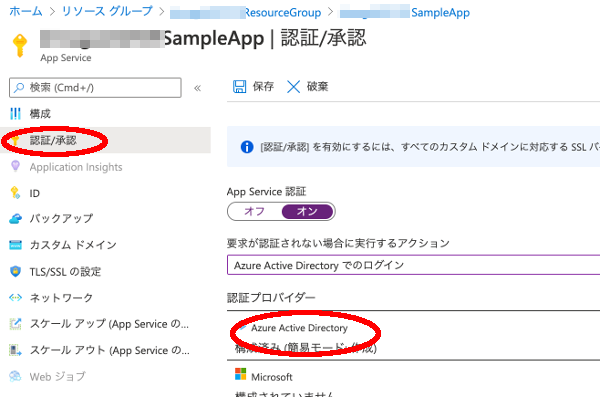 [許可されるトークン対象ユーザ] にエラー時に表示された token.Resource の値を追加。 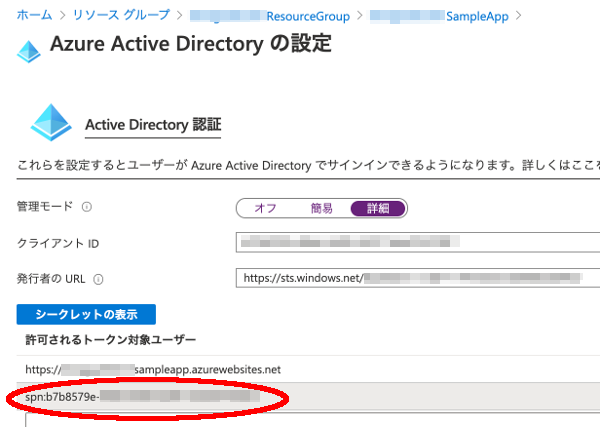 再実行 go run test.go
:
Download status : 200
Download length : 68
Download data: {"message": "This is Sample response! (2021-01-05 09:45:26.530852)"}
|
 app_settings4.png 379件
[詳細]
app_settings4.png 379件
[詳細]
 app_settings3.png 352件
[詳細]
app_settings3.png 352件
[詳細]
 app_settings2.png 399件
[詳細]
app_settings2.png 399件
[詳細]
 app_settings1.png 382件
[詳細]
app_settings1.png 382件
[詳細]
 app_auth_setting2.png 355件
[詳細]
app_auth_setting2.png 355件
[詳細]
 app_auth_setting1.png 366件
[詳細]
app_auth_setting1.png 366件
[詳細]
 create_user.png 341件
[詳細]
create_user.png 341件
[詳細]


